counter hit make Recording
Home Recording for the Financially Impaired
back to Articles

Since posting audio samples on my site, I’m asked from time to time about how I do my recordings. This short article is intended for those working on a tight budget and with little or no expertise in recording.

The equipment I’m using:

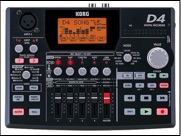
Korg D4 Digital Recorder
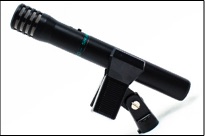
Shure BG 4.0 Microphones
Sennheiser PX 100 Headphones
Audacity (audio editing freeware)
Audacity
KorgD4 ShureBG40
Korg D4 Digital Recorder
Audacity (audio editing freeware)

Shure BG 4.0

The most important link in your recording chain is the microphone. Most experts agree that a condenser mic is best for recording the guitar. If you get a bad sound from your first attempts, don’t automatically assume you need a better mic. Mic placement is crucial, and you should spend at least an hour experimenting with this. Don’t place the mic a short distance directly in front of the soundhole—you’ll get a boomy sound on bass notes. For my taste, placing the microphone about half a meter to my right and pointing toward the bridge gives the best sound.

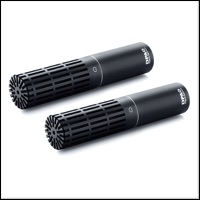
You’ll get a better sound with two mics, even when recording solo guitar. For me, the best set up is the first mic placed as described above, and the second mic placed an equal distance to my left and pointing to the twelfth fret. But again, you should experiment with this, as different mics and recording spaces require different placements.

Some digital recorders have a built in microphone. Don’t expect much from it. I’ve tried the Korg’s internal mic and wasn’t impressed. I would use it only as a last resort. So assume you’ll need to use external microphones.

The Korg D4 records files onto a memory card. The one that comes with the unit is only 64MB—far too little for any ambitious project. I bought a 512 MB card, and that seems sufficient for anything I’ll ever do. (If you plan to do long recording sessions, you might want to go for a 1 or 2 GB card.) When done recording, I hook the Korg to my computer via a USB cable, hit a few buttons, and I’m ready to begin editing.

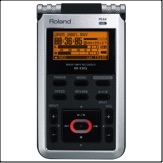
A suggestion: though I’ve not used it myself, I’ve heard good things about the Edirol R-09HR Recorder. You can learn more about it here.

I do all my editing with Audacity. You can mix tracks, edit, and add effects. The user manual, though well written, is very spartan. So learning the software means a lot of trial and error. But you can do some pretty good work with it. In general, you’ll find editing is far easier on a computer than on a digital recorder. You can convert your soundfiles to WAV format (a lossless file suitable for burning a CD) or MP3 (a lossy file suitable for internet audio samples).

Chances are that you don’t have a good reverberant room to record in. You can add reverb through Audacity—look for “GVerb” in the effects menu. Most people find the default settings to be useless. But with a little experimentation, you can find settings that work for you.

There’s nothing particularly fancy about my recording setup. I have the recorder sitting on a small wood table to the left of my chair. This way I can work the recorder with guitar in hand. I also keep my old Boss TU-12 tuner there to ensure I stay at concert pitch. I use headphones for all monitoring, whether setting levels, listening to playback, or listening as I record.

As part of my learning curve, here are some things I’ve found about recording:

• Budget lots of time. Recording engineers will tell you it takes about an hour to get one minute of a final recording. After you’ve gone through a dozen takes trying to get one minute of error-free playing, you’ll know this isn’t an exaggeration. Recording is nature’s way of teaching us humility.

• Check the tuning of your trebles before every take.

• Assume your early takes will be a disaster.

• Learn more profanity, so you don’t endlessly repeat the same words.

A final word of advice. If you’re new to recording, you may find this a confusing subject. You have my sympathy. Audio experts tend to speak an esoteric language incomprehensible to the likes of me. I simply did some research and bumbled my way forward, learning as I went. My guess is that you’ll need to do the same. But with time and patience, I got good results. There’s no reason why you can’t do the same.


back to Articles

item4a

phone: (216) 691-5949—e-mail: augustineregal@yahoo.com

Tom Poore © 2005. All rights reserved. Reproduction of any material from
this site in whole or in part without expressed written consent is prohibited.
South Euclid, Ohio, USA